Showing posts with label student centered learning. Show all posts

Tuesday, October 11, 2016

FTT - Seesaw

Student Driven Digital Journals and Portfolios? Yes Please!

@LisaBerghoff/@Joe_EdTech

This week's free tech tool comes to us from HPHS world language teacher Weifang Wang (@WangWeifang).


The sweet spot for teachers of any content is when you have students who are taking ownership for their work, reflecting on their learning, and articulating all of that both in and outside of the classroom. As a teacher, the joy is in guiding students towards learning and then getting out of their way so they can express their understanding of new ideas, concepts, and analysis of information, while connecting this new understanding in a way that is meaningful.

The Seesaw platform is designed for student-driven digital portfolios. It is so simple to use, it quickly became a favorite of elementary teachers because kids can truly do it on their own. What I love about Seesaw for high school students is that even though it is easy to use, the tools are powerful and robust. As we are searching for tools that help us to differentiate for all of our students, Seesaw allows for students to add photos and videos (uploaded OR recorded on Chromebooks), drawings, links, text, notes, or files to be uploaded. Once added, our students can write captions or leave voice recordings of their reflections. Seesaw also has the ability to set up a class blog for you. You can password protect it and decide if you want to allow comments. Once your blog is set up, both teachers and students can post to it. 

Here's how it works:
1. Students log in using their Google account and they input the class code that teachers get when they create a class.

2. As a teacher, you can post to an entire class or just to select students. You might post a prompt and ask your students to show their work, reflect, and respond.

3. If you just want your students to begin without a prompt from you, they can click on the green plus button to add an item. Students can easily use their Chromebook camera to take photos or videos and add them into their seesaw journal. 
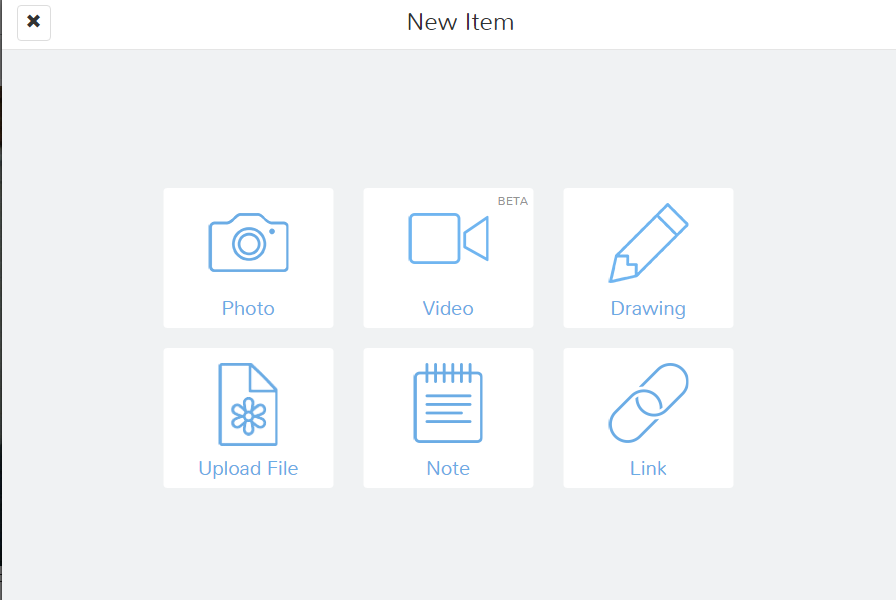
4. Once they have added an item, your students will add a caption OR leave a voice recording that talks about the work they are displaying. 

 5. Teachers must approve students' journal entries so we are able to help guide them towards habits that will help them create a positive digital footprint. While they are learning, Seesaw provides a safe environment. Seesaw has earned a very high rating on common sense education, which is a very respected reviewer of educational applications. 

From another perspective, as a parent, it is difficult for me to know what is going on with my kids schoolwork now that they are doing so much of their work digitally. I can't just go into their backpacks and look through their folders (thank goodness!). All of the digital work can be unnerving because I want to support my kids and have conversations about what they are doing in school. 
Seesaw makes it easy to connect parents to see their students' work and be able to have a "window into my child's school day", according to the seesaw website. This of seesaw as a communication platform between students, parents, and teachers.  

Seesaw can be used on any device and the free version has an outstanding platform with features that students will actually want to use. 


Here is a screenshot of my first photo journal entry to my Seesaw class!


Are you using Seesaw or digital portfolios and blogs in your classes? Post in the comments below and share your thoughts. 

Tuesday, October 4, 2016

FTT - uBlock Origin

Decommercializing the Web for the Classroom (and Maybe Home, Too)

@joe_edtech/@LisaBerghoff

Today we are proud to start featuring Free Tech Tools proposed by some of our classroom teachers. This guest post is from DHS Social Studies Teacher, Dan Kim (@TheMrKim).

I had always considered myself to be a price-savvy, prudent consumer who wasn't susceptible to the same greasy advertisement schemes, ploys, and tactics that suckered the rest of society.

And then I began shopping for an engagement ring.

One of the best and worst parts of planning a proposal is the immense pressure of creating that perfect moment of astonishment and surprise.The mental gymnastics involved in somehow discretely acquiring a person's ring size, or moving the little ring box from its original hiding place in the bathroom closet, into a much safer, much smellier left tennis shoe in the middle of the night, speaks volumes of the necessity for discretion.

You could then imagine my horror when after a few nights of researching engagement rings online, my browsers were now full of engagement ring related ads and pop-ups basically screaming at my girlfriend that things were about to get real.

Now if you've done any amount of online shopping, you will either find it creepy or helpful that firms will often keep tabs on your search history to populate relevant ads on your websites. Led by internet giants like Google and Facebook, ads have become more and more sophisticated and pronounced.

IMBD Site WITH Ads
This is where a neat, light-weight Chrome Extension called uBlock Origin comes in. uBlock Origin will filter and block the majority of ads that you see and experience on the web. Without going too deep into the ethics of ad blocking, it is safe to say that ads are detrimental to the classroom environment.

IMBD Site WITHOUT Ads - uBlock Origin
Ever try to show a YouTube video in class that was preceded by an inappropriate, awkward, and unskippable commercial? Or see a popular website taken over by large, obnoxious advertisements? uBlock Origin can help.

Perks of uBlock Origin:

  • Websites will load faster
  • Mobile users won't have to waste data on bandwidth-hogging commercials or advertisements. 
  • Filters advertisements that contain viruses, malware, and phishing messages.
  • Block all ads on YouTube


Once installed, users will not have to do anything to enjoy the benefits of uBlock Origin. It's a simple plug-and-play extension that works so well that at times I forget it’s even installed!

Now there are a few things to consider once the extension is installed. Some websites have caught on to ad-blocking, and will not allow users access to their sites until the ad-block is disabled. Users can simply pause uBlock Origin by clicking on the giant power button on the menu on the top right corner of your browser.


Are ads disrupting your online educational experience? Feel free to post comments below!
--------------------------------------------------------------------------------------------------------
Gotta free tech tool you'd like to share? Contact Lisa or Joe to be a guest blogger!


Tuesday, April 19, 2016

FTT - OpenBadge.me

Changing the Educational Game
with Digital Badging

@joe_edtech/@LisaBerghoff


A couple of years ago, I attended a conference that hosted a TEDx event instead of a Keynote address. Perhaps the most outstanding speaker I saw that night was Ali Carr-Chellman from Penn State University who talked about her program, "Re-Engaging Boys." If you have a few minutes, you can watch her TED Talk below:


If you don't have time to watch the whole thing, here's a brief summary of a couple of the statistics she cites:

  • For every 100 girls suspended from school, there are 250 boys suspended from school.
  • For every 100 girls expelled from school, there are 335 boys expelled from school.
  • For every 100 girls in special education, there are 217 boys.
  • For every 100 girls diagnosed with emotional disturbance, there are 324 boys.
  • The numbers are worse for boys of color, or boys who come from economically challenged homes.
  • Boys are 4 times as likely as girls to be identified with ADHD.
  • 60% of Baccalaureate Degrees go to women - some universities are approaching 70%
One of Professor Carr-Chellman's suggestions is that we can re-engage boys by utilizing video games in the classroom. While her research might be the most extensive on the topic, Professor Carr-Chellman's conclusions are not unique. There is a growing chorus of teachers out there who suggest that adding some elements of gamification can boost student engagement across the board, but especially in boys. 

I started thinking about this topic again because Lisa and I attended the CoSN conference two weeks ago, and the most dynamic session I attended while I was there was about gamification in the classroom by Dr. Liz Kolb from the University of Michigan. Dr. Kolb said her research was really in its beginning phases, but she had seen some positive results by adding elements of gaming to her preservice education courses, and she reported that those gains were highest amongst her male students.

Dr. Kolb suggested that it is fairly easy to start the process of gamification by instituting some student choice into your classroom activities and awarding students digital badges based on accomplishments. I think I'll have much more to offer the district from Dr. Kolb's work in the very near future, but for those of you who might be ready to start badging in the classroom, you need two things. You need a site for creating badges, and you need a site for posting and awarding your badges. For this week, let's focus on creating digital badges.

Part of the Mozilla Open Badges Project, OpenBadges.me allows you to create simple graphic badges that you can download to your computer and post to any website. According to the website, the OpenBadges.me "designer provides a simple way to layer different shapes and images on top of each other to create an attractive Open Badge graphic. The tool lets you add text, color elements, move certain elements and even fade items in and out - all presented in an easy-to-use web page."


Click here for an easy to follow guide on using OpenBadges.me. If you get stuck, you can even go to the guide and post a question. Someone from the Open Badges community will respond to your question.
----------------------------------------------------------------------------------------------------------------------

Next week, I'll provide you with three different platforms for posting and awarding badges to your students.

Tuesday, April 5, 2016

FTT - Twitter for Professional Development

"Follow me! Follow me to Freedom!"

@joe_edtech/@LisaBerghoff

Well, that might be a little dramatic, but I always get excited when we can connect in very cool new ways. And this is cool, I am writing to you from my "spacious" coach seat on board my American Airlines flight to Washington DC. Lisa and I are attending and presenting at the CoSN National Conference on Ed Tech Conference this week. Of course, we'll share our presentation and all of the new resources we get when we get back. But, we really don't want to wait that long to tell you about the great things happening here. 

Even if you never send a Tweet, Twitter can be an amazing Professional Development tool for educators. This week, Lisa and I will be Tweeting out lots of information from the Conference, some of it you'll be able to use in your classes right away. Some of it will just be fun. For instance, we got to hear Daniel Pink, author of Drive: The Surprising Truth About What Motivates Us, give the Keynote address. He opened the tech conference by talking about how important devloping art skills is. And he challenged everyone in the audience. "You can't change everything in your school district at once, but you can one small thing you can change tomorrow and make things better."

We also got to meet Megan Smith, United States Chief Technology Officer, Assistant to the President focusing on how technology, policy, data and innovation can improve the future of our nation. She talked about the importance of offering creativity tools, maker spaces, and authentic coding experiences to reach even our most disenfranchised students.

Lisa and Joe Hobnobbing with Megan Smith

To follow the rest of the conversation and conference activities, all you have to do is get a FREE Twitter account and search for the hashtag #CoSN16. If you are new to Twitter, here's a short video from Dan Krutka, Ph.D..to help you get started:

Once you get logged in, try following some of these great educational resources:

  • Edutopia - The George Lucas Foundation for Education
  • NSBA - The National School Board Association
  • David Pogue - Tech columnist, NY Times; PBS NOVA host; Missing Manuals creator, dad of 3!
  • Common Sense Media - Organization for Research Based Digital Citizenship Curriculum
  • Deerfield High School
  • Deerfield High School Libraries
And that doesn't even scratch the surface. You can follow writers, other teachers, colleges, organizations, teams, politicians (ugh, I don't recommend following them).

Here are some great lists and resources you can use.

All you need to do to get started is create an account on Twitter.com. HOWEVER, before you do, click here and check out "The Ultimate Twitter Guide for Teachers." Jeff Dunn (@edudemic) provides you with:
And much, much more.

Once you start using Twitter, you'll learn about "hashtags" (#). They are used in Tweets to denote important topics, and to make Twitter feeds more searchable and user friendly. The most important hashtag for educators is #edchat. Click here to get an idea of the myriad of topics discussed on Twitter labeled #edchat.

Find Twitter Here - And create your free account today.

By the way, there are two great HashTags (#) you should be following and contributing to if you are on Twitter:

#DHS__Pride = Tag the great staff, students, and accomplishments we have.
#D113PLN = Contribute to our online Professional Learning Network


MOST IMPORTANTLY, this week, follow #CoSN16.  Our session, "What NOT To Do With Technology In The Classroom" will be Tuesday, April 5, from 1:45 to 2:45 Central Time.

Tuesday, January 5, 2016

FTT - Text 2 Mind Map

Text 2 Mind Map Home Screen
Support Both Linear & Non-Linear Thinkers With Text 2 Mind Map

@joe_edtech/@LisaBerghoff

You don't have to spend very much time trying to solve a problem or work through a set of directions with a group of people before you figure out that people think about things differently. I have two friends who love to put things together and are considerably better at that than I am. However, they go about it in very different ways. One is meticulous about reading every word of the directions provided or manuals included before he ever attempts construction. Then he will lay out all of the materials and tools and follow the directions line by line until he is finished. Friend number two is a tinkerer. He believes that directions and manuals represent the least possible creative way to complete the job. Since I've seen them both build some amazing and beautiful things, it is impossible for me to say which one of them is doing it "the right way."

The same kind of thing applies to the classroom. I've worked with teachers who insisted that their students take notes a certain way, sometimes using a certain color of pen, highlighting, and underlining, and numbering the items exactly as the teacher would have done it if the teacher were taking the notes. I even understand this method of teaching - some students really need some directions on taking notes. However, in my first year of teaching AP European history, I met a student that simply didn't think in a fashion that fits with structured note taking. Often times, when he was trying to understand relationships, he would draw pictures. Since he was easily the best, and most engaged student in the class, it would have been silly for me to require him to take notes in a manner that is awkward and foreign to him. That is why I believe it is important for us to offer students choices, and help them learn how they best learn.

In a previous blog post, I wrote about the importance of making Mind Mapping available to kids who don't necessarily think in a linear fashion. But what do you do if you have to accomodate both linear and non-linear thinkers in one group? Text 2 Mind Map is a pretty simple Web 2.0 solution that allows kids to create Mind Maps from outlines. They maps can be downloaded or shared via email. Here is a brief overview of using Text 2 Mind Map:


The downside to Text 2 Mind Map at the moment is that it isn't truly a collaborative Web 2.0 tool. In other words, your students can't create accounts (that is a premium feature) and share editing privileges with another student or with you. This is strictly for creating a mind map from an outline.

-----------------------------------------------------

What tools do you use to help kids think about their own thinking?


Tuesday, December 15, 2015

FTT - Quizziz


Quizizz: Fun, Engaging, Multiplayer Classroom Quiz Games and Yes, Students Can Play From Anywhere!

@LisaBerghoff / @joe_edtech


I'll admit that I can be a sucker for bells and whistles.  I love toys and games and fun in the classroom if they are used in a purposeful way.  When students come back and visit years after graduation, it's the funny, silly activities that they remember and connect with most.  Do any students come back and say "Remember that time when we sat in rows quietly and took notes?" I recently led a workshop and asked teachers from various schools to describe what their classroom looks like when their students are truly engaged.  Words like "active", "participation", "loud", and "excited" came up as the teachers thought about a time in their classroom when students were engaged.

Of course, the topic of Kahoot often comes up during these types of discussions.  Remember the first time you did a Kahoot?  You will absolutely not get that kind of response when you assign a worksheet.  That's because tools like Kahoot are engaging and fun by design.  They allow students to participate in a way that does not require them to push too far out of their comfort zone, but still makes you feel like you are playing a game and taking a risk.  One of the most common questions that comes up with Kahoot is whether or not students can participate in these fun quiz games on their own or from home.

That is why I am thrilled to share Quizizz with you. 

http://www.slideshare.net/Quizizz/quizizz-presentation-49737217

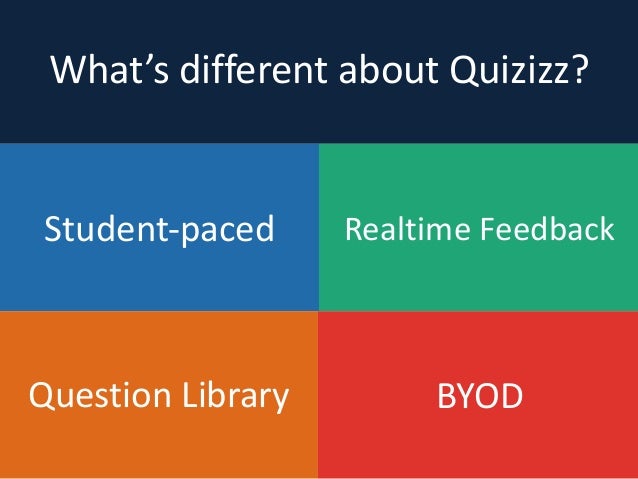
Quizizz is  a free, online tool that allows you to create classroom game show-like quizzes.  Similar to  Kahoot, the students have questions and  up to 4 options for responses.  You can create your own or use one that has already been created.  You can even create your own quiz but then steal collaboratively take advantage of individual questions that other teachers have made and put them into your own quiz.

There are several key features that make Quizizz different from Kahoot.  First, you can adjust the timer from 5 seconds to 15 minutes of time allowed to answer a question, or you can adjust the settings so the question timer is off completely. You can play the games live during class but allow students to play at their own pace because the entire question shows up on the students' screens.  The way Quizizz works is such that you can play at your own pace but still feel like you're playing against your classmates.  Quizizz also has a feature that allows you to assign the quiz for homework. There is a  calendar feature to set the days that the quiz is open and give your students the Quizizz code to join your quiz. It also has a meme generator that will give the students instant feedback by way of funny kittens and silly graphics. Another feature of Quizizz is that when students finish playing, they get valuable data showing how they did on each question. 

When your students first log in at join.quizizz.com, they will enter the game code and their name.  In order to effectively grade the quiz, I suggest mandating a naming convention so that students must enter their first name and last initial or some other standard format so you will know who is participating.  The students are then assigned an avatar (mine was an adorable sheep with glasses) and then are prompted to proceed.  As students are answering the questions, they are given immediate feedback on how they did on each question.  Once they are done, they can see how they did on all of the questions and they can go back and review the questions.

https://twitter.com/quizizz/status/562659247066861568


As the teacher, you can pull up a "report" that shows the percentage of students who answered each question correctly.  You can also click on individual students to see how they did.  The reports page gives a very easy to read graphic so you can quickly see which of your students need more instruction. This type of formative assessment is quick and easy to put together, fun for the students, and very helpful you teachers as we make instructional decisions.


Quizizz can be used at any point during instruction.  You can then show the questions in slide show mode so you can explain and walk through the most missed questions.


Want to see more?  Here is a short video walk-through of Quizizz.
You're Welcome!


What are some of your favorite tips and tools for classroom engagement?  Share in the comments section below. 

Tuesday, December 1, 2015

FTT - Bee Line Reader


Easy On The Eyes! Read More In Less Time With Bee Line Reader

@Lisa Berghoff /@Joe_EdTech


In the past several years there has been a giant push for educators to have a better understanding of literacy skills.  We know that reading is imperative for learning and we know that comprehension plays a major role in multiple subject areas.  However, certain aspects of reading that often get overlooked are fluency,  decoding speed, and tracking ability, especially when dealing with reading digital text.  As more and more of our text is presented in digital format, it is necessary for educators to explore ways to help our students follow what they read with increased speed and decreased eye strain.  

Bee Line Reader makes reading faster and easier by making a color gradient that guides your eyes from the end of one line to the beginning of the next.  I have been using the Bee Line Reader for 2 weeks and this simple tweak does seem to be helping me with both focus and eye strain.  The Bee Line Reader is an extension that can be found in the chrome web store.   You can use it as much as you want for free for 30 days. After that, you can continue to use it 5 times per day for free or upgrade to the pro version.  

I believe that the Bee Line Reader can benefit all of our students, but it might be a game changer for our kids with dyslexia, ADD, or students  who struggle to decode. 

Here's the explanation of how it works, while using the Bee Line Reader:

Tuesday, October 13, 2015

FTT - Interactive Timelines

Rethinking History With Interactive Time Lines

@joe_edtech/@LisaBerghoff

Creating historical time lines is certainly not something that is new to education. However, creating interactive time lines online really does represent teaching "above the line" in the SAMR model. And in fact, with the power and versatility of these tools, you can do some really outside the box things with interactive time lines. 

When I started writing this post, I was looking at a "free" tool called Tiki Toki - and I haven't even linked it here because the free version is incredibly limiting. But it really sparked my interest because in addition to being able to create traditional time lines of events, enhanced with video, pictures, maps, and text, the creators suggested you could use it to create enhanced project time lines. For instance, if there is a complex, multifaceted group project your students are working on, they could input dates, details, and goals into the time line to help organize their thinking. However, like I said, the free version of Tiki Toki really only lets you create one fairly static time line. When it comes to educational tools - one size does not fit all, and there is usually more than one good choice.

So, I went searching for something better, and genuinely free to use. Christopher Pappas of eLearning Industry provides a list of 10 truly free interactive time line creation tools specifically for the classroom. In my opinion, the best of this list, and one that is completely compatible with Chromebooks, is called myHistro. Combining a truly easy to use multimedia platform with all of the very best ideas from Google Maps, myHistro provides students with a platform for explaining historical events, planning trips, functions, or projects, mapping out important events or plot developments in a piece of literature, or organizing and archiving personal trips. The embedded video below explains how to get a free myHistro account and how to get started on time line creation:


One way to introduce this tool is to provide this software as an option for your students if you are having them create a project for your class. Rather than having them make a PowerPoint presentation or a Prezi, give them the option of making a myHistro time line.

Tuesday, October 6, 2015

FTT - Canva


Easily Create Beautiful Designs and Documents with Canva


@joe_edtech/@LisaBerghoff  


I talk to so many teachers who say "Oh, I'm really not a tech person".  Of course those of us who are into growth mindset understand that all that really means is that it will take time, hard work, and perseverance to improve on those skills.

Well, I'm here to tell you that I'm REALLY not a design person. The part of people's brains that makes sense of space and where things go in a room, on a page, or even clothing on a body just doesn't seem to be present in my brain.  I do, however, enjoy using tools that make it seem like I am a design person because I can still create amazing images even though I've had a little help.  I also understand the importance of visuals in the classroom and if you're going to use them, the quality needs to be fantastic.

Think about your students.  You probably have some amazingly creative students and you probably have some students who cringe at any sort of artistic project. We know that students learn best when they have multiple opportunities to work with new information in different ways.  Therefore, we often ask our students to create presentations but we don't give them information about basic principles of design and so we end up looking at powerpoint presentations that are filled with tiny text or images that crowd the screen.  That is why I'm excited to introduce you to Canva.com.

Canva allows you to create presentations, social media graphics, online posters, magazine covers, documents, marketing materials, etc. that look fantastic with very little experience in the world of design.  The website is free (there is also an ipad app) and there are thousands of free open source images to use, as well as some options for purchase.   Of course you can always use your own images and easily drag and drop them right into your Canva design.

Canva was founded by Melanie Perkins, who was teaching graphic design programs at the University of Western Australia.  When she realized that many of her students struggled with the basics on tope of trying to learn complicated programs, she decided to create an online tool that would allow new students to experience success with less frustration.
                                                                   

Screenshot of Canva Design School
The drag and drop format of Canva makes creating professional looking visuals straightforward and non-threatening.  There is also a "design school" tab with tutorials and teaching materials intended for classroom use. I managed to successfully navigate three of the basic interactive tutorials in about 15 minutes. The beginner's challenges  highlight basic principles such as the benefits of color and the idea that less is more.  Some of these may seem obvious to you, but to me (and many of your students) it was helpful to see and interact with the examples to observe the differences in design.  The Canva blog is fascinating and covers topics such as Powerful Examples of Visual Propaganda, and Build Your Brand: How To Choose The Right Fonts. 

I highly recommend that you take a few minutes to check out Canva.  You can easily create wonderful visuals to use in your teaching, or have your students get creative and share with you, each other, or the world.  How do you use the power of visuals in your classroom?  Post in the comments section below.
Canva image created by Lisa Berghoff

Tuesday, September 15, 2015

FTT - StayFocusd

Helping Kids Teach Themselves To Avoid Distractions

@joe_edtech

One of my favorite blogs is "Mind Shift: How we will learn," a product of Northern California's Public Media outlet KQED. One of their posts that came up in my Twitter feed this weekend was called "Age of Distraction: Why It's Crucial for Students to Learn to Focus." There have actually been a ton of studies done on this dating back to the 1970s. Some of my favorite pieces have come from Daniel T. Willingham, cognitive psychologist from the University of Virginia. Both the studies featured in the "Mind Shift" article and the ones from Willingham suggest that it is important for educators and parents to help kids learn how to manage distractions, especially distractions that are readily available to them on digital devices. This research, by the way, is one of the reasons I don't support the idea of simply blocking social media and other sites on school devices. That doesn't teach them discipline; it actually ignores the long term issue.

However, as you know, kids learn differently. Some of them require a little more direct instruction and a little more scaffolding of skills. StayFocusd is a free extension, available in the Chrome Web Store, that can offer a little assistance to kids who need it. One of the problems for some kids, and perhaps this director of instructional technology, is that they can get lost on distracting websites and not even know how much time they waste there. StayFocusd can help quantify wasted time and allow students to limit wasted time.
StayFocusd in the Chrome Web Store


The Nuclear Option
Once you add the extension to Chrome, you can set your own time limits on websites that might be distracting you from your real work. You can decide to enact the "Nuclear Option," which means, for instance, that you can set a specific amount of time that you are allowed to spend on Facebook. When that time limit is reached, Chrome will shut down that tab and the program won't allow you to navigate to the site again for 24 hours. You can also set an "active" calendar, meaning that StayFocusd will always manage your browser during school days, but on the weekends and during holidays, you can grant yourself a little more browsing time. For students who are afraid they might cheat and change the settings, there is a "Challenge" option. "If this option is selected, you will be required to complete a difficult -- but not impossible -- challenge before you are allowed to change any settings. This makes it inconvenient for you to change settings, therefore reducing the chances that you'll cheat" (StayFocusd settings page).

For some teachers, StayFocusd falls short of their ideal because it doesn't allow teachers or counselors to directly manage the student machines. However, I see that as a strength, because what we are really doing is providing the tools necessary for kids to teach themselves to be in control of their devices and their digital lives.

If there is a student you think could benefit from StayFocusd, please share it with them - and maybe their parents, too.

Thursday, September 3, 2015

Growth Mindset #1

I Can't Do That...Yet!
Teaching Kids To Have A Growth Mindset

@joe_edtech

I have a friend and colleague who gets very upset when he hears adults say with some merriment, "Oh, I'm just not good at math!" His argument goes a little something like this: You would never hear an adult proclaim that they can't read because letters just aren't their thing, but it is somehow ok to say that you aren't good at math because numbers aren't your thing.

I actually get that. It harkens back to one of the most dangerous concepts every embraced in education, that people are born with a certain kind of ability or they aren't, and that's all there is to it. Well, if that is the case, I'm not really sure why we spend this much time in public schools.

As adults, we certainly select jobs, hobbies and activities based on attitudes and aptitudes, but I think it is anti-intellectual and dangerous, especially for young people, to accept that kind of thinking. I think it comes from a way of thinking that suggests that making mistakes or experimenting with mental concepts is a sign of weakness, instead of a sign of real strength. If I thought like this, I would have to accept that because I cannot do calculus right now, I can never do it - I'll never be a success in that field.

By the time they get to high school, too many of our students have accepted that they aren't good at math, or science, or school in general. My daughter is an 8th grader who sometimes falls into that trap with school, but never so when it comes to extra-curricular activities she is interested in. She's in color guard. That means she spins flags, sabres, and rifles while dancing - ok, that may not be everyone's wheelhouse. But, when she tries a new toss with her rifle (she's currently working on something called a quad) she doesn't expect to get it right away. She does, however, expect that with study and practice, she will get better - and she will ultimately gain mastery. As an educator, I find that very instructive.

Carol Dweck, psychologist from Stanford University, would suggest that when she practices color guard, my daughter is employing "The Growth Mindset," which that suggests that humans can set and achieve personal goals, and that what is ultimately important is that we believe we can get better at something. We believe that we can grow, and we accept mistakes as necessary growing pains along the way.

Think about the kids you know. When it comes to extra-curriculars, sports, activities, and hobbies, do they display a "Growth Mindset?" How about in Math? Science? English? Using Technology (no - it is not ok to simply say, I'm sorry, I'm not good at technology)?

How about you? When you try something new, what is most important at the beginning of the activity, immediate success or evidence of growth? 

----------------------------------------------------------------------------------------------------------------
"The Growth Mindset" is an idea worth developing. Next week I'll share some ideas for discussing this topic with your students.

Thursday, May 7, 2015

Measuring Success in 1:1 Programs - Pt 2

photo credit: Measure via photopin (license)

What Are We Looking For When We Measure 1:1 Programs?

@joe_edtech

This is part 2 of what I'm calling my self-indulgence series. In a completely selfish attempt to better understand the research that I want to do in my doctoral program, the posts over the next few Thursdays will focus on getting to meaningful measurement of 1:1 programs. I will provide in text citations for a number of pieces, if you would like a full reference list or links to any of the individual documents, please don't hesitate to contact me.

Does 1:1 Computing Facilitate Learning and Improve Performance?

As instructional technologists, the disconnect between the expectations of a 1:1 classroom and the dearth of supporting data seems to strike at the very heart of what we do. The 
Association for Educational Communications and Technology (AECT) concisely defines the field of educational technology as “the study and ethical practice of facilitating learning and improving performance by creating, using, and managing appropriate technological processes and resources” (Januszewski & Molenda, 2008, p. 1). If researchers, instructional technologists, and policy makers cannot provide taxpayers, parents, and even students with convincing evidence that the massive investment in educational technology leads to increased student achievement, then it could rightfully be concluded that we have failed to fulfill any tenet of the definition provided by the AECT. Specifically, though, the problem of providing supporting achievement is drawn from the fact that it is the specific charge of instructional technologists to “facilitate learning and improve performance” (Januszewski & Molenda, 2008, p. 1).  If we, as instructional technologists, expect continued investment in 1:1 programs because we believe that it helps to facilitate learning and could significantly improve student performance, it is incumbent upon researchers and professionals to conduct studies and develop experiments that support our assumptions.

This really gets to the heart of the matter. In the chapter that explicates the facilitating learning portion of the definition of the field, the authors point out an important change in the way the field is designed. In the past, it might have been logical to consider instructional technologists as support personnel instead of instructional leaders, because our focus was on control and management of the learning environment (Januszweski & Molenda, 2008). However, under the current definition of the field, it is our job to actively work to facilitate learning through the lenses of established and researched learning theories like Behaviorism, Cognitivism, and Contructivism (Januszweski & Molenda, 2008). Furthermore, in the chapter that details the improving performance of the current definition, the authors push instructional technologists even further into the role of instructional leader by explaining that we bear the burden of fulfilling the promise of instructional technology to “help create instruction that is more appealing and respectful of human values, thus aligning instructors and designers with their highest professional commitments” (Januszweski & Molenda, 2008, p. 55).

The descriptions in the Januszweski and Molenda (2008) book match the vision of four key scholars who have pushed the field and the discussion about the 1:1 classroom and student achievement. Before the concept of the personal computer was even fully realized, Papert (1980) was imagining a world where computers in the hands of every student would dramatically alter education and our understandings of student learning. The theory of Constructionism, an offshoot of the larger Constructivist learning theory, was based on the idea that students having the ability to explore and create through the power of personal computing would inevitably transform education. The Constructionist banner, and the belief that putting powerful computing tools in the hands of students to let them create and invent was taken up by Stager (1998, 2011) and pushed by his Constructivist Consortium.  However, no one has made more headway in describing what transformative teaching looks like than Dr. Ruben Puentedura and his SAMR framework for integrating technology in classroom (Fabian & MacLean, 2014; Oakley & Pegnum, 2014; Oakley, Pegnum, & Johnston, 2013). All three of the scholars above described a 1:1 learning environment where education was transformed and students achieved at higher levels and all of them have worked towards not only articulating, but also achieving that vision.

Critics of continued investment in 1:1 mobile technology would point out that the disconnect between high scholarly expectations for new technologies to be transformative in the classroom and the realization of those transformational dreams is not a new one. Reiser (2012) carefully traced the history of instructional technology in the United States throughout the 20th Century and concluded that while every innovative piece of instructional technology was introduced to the classroom with bold predictions of changing education, each one failed to achieve the promised benefit to students. To be fair, Reiser (2012) did not conclude that the technology was incapable of achieving the aims of the visionaries who championed it; he concluded that it failed because it was either implemented poorly or it faced resistance by teachers who were charged with implementing the technology in the classroom.  Even Stager (2011) seemed to draw a similar conclusion when he wrote that after 30 years of trying, instructional technologists and school systems have been unable to convince teachers to use computers in any sort of broadly transformative way despite predictions to the contrary. 

But the belief in 1:1 computing to be transformative runs broadly and deep, and that is especially true with the nearly ubiquitous proliferation of mobile computing devices (Bebell, Clarkson, Burraston, 2014; Gulek & Demirtas, 2005; Lowther et al., 2012; Project Tomorrow, 2014; Russell, Bebell, & Higgins, 2004). In fact, the belief in mobile technology to create better learning environments is broadly held. The “Speak Up” survey conducted by Project Tomorrow (2014) reported that a majority of K-12 principals, teachers, and students reported that the ideal classroom is a 1:1 classroom. And it is no wonder why they feel that way. Gulek and Demirtas (2005) concluded that the simple introduction of 1:1 devices into the classroom led to more engaging, Constructivist teaching methods. Educators, however, must find the evidence necessary to support their beliefs, because a majority of parents, those who must support school district technology purchases with their tax dollars, do not wholly support the integration of technology into the classroom, and only a minority of parents support investing in more 1:1 classrooms (Project Tomorrow, 2014).
----------------------------------------------------------------------------------------------
At this point, is it more critical to provide this kind of evidence to taxpayers or educators?

Thursday, April 30, 2015

Integrating for Learning

Image: "Newspaper v. Internet"
A Classic Tale of Google:
Teaching Deep Reading With Google Docs

@joe_edtech

It's really not about all the flashy Apps available. It's about connecting students and providing them with a variety of learning opportunities. 

DHS English Teacher David Hirsch has taken the opportunity to use instructional technology to open our students to a world of Classic Literature. Faced with the daunting challenge of teaching freshman A Tale of Two Cities by Charles Dickens, Mr. Hirsch decided to use technology to meet kids where they are. In addition to providing the traditional paperback novels to his students, he copied the text provided by Project Gutenberg into a series of Google Docs, and he made a recording of himself reading the novel and made that audio recording available to the students as well. 

His students read the book, using the format they chose, and then annotated the readings together on the Google Doc that had been shared with the whole class. Mr. Hirsch calls this "Social Annotating." His students were going online to help each other understand Dickens. 

Mr. Hirsch explains the activity and the success his students have had in the video below (part of the Innovation in Education Series in the Principal's Newsletter):

               DHS English Teacher explains "Social Annotating" to Principal Audris Griffith

Innovation without flash, and based on very sound teaching philosophies. The best teaching rarely comes packaged in a premium subscription. When I first asked Mr. Hirsch about this project, he told me, "It is a far, far better thing that I do, than I have ever done..." Well, he didn't say that; but it would have been funny.

To learn a little more about this process, please take some time to visit Mr. Hirsch's Blog, linked here.

-------------------------------------------------------------------------------------------
I would normally try to end my blog post with a probing question, or a challenge. However, my principal, Audris Griffith, is retiring and this is her last monthly newsletter as Principal of Deerfield High School. I have only had the privilege of working with Audris for a short time, but I wanted to take this opportunity to say that it has indeed been a pleasure. I am certainly not alone in saying you will be missed, and we wish you the very best!

Thursday, February 26, 2015

OER - Teacher Collaboration

See Attribution Below
OER Is More Work - Why on Earth Would I Do That?

@joe_edtech

Tuesday, my blog post was about all of the Open Educational Resources (OER) available to us thanks to projects like Lumen Learning and Creative Commons. Today I want to discuss why we would want to invest our time in searching for, adapting, and using OER. After all, that certainly sounds like a lot of extra work. I'll skip the obvious diatribe about the democratization of information on the grand scale of Gutenberg's printing press revolution and just focus on the products we provide to students, for now.

Anna Yezierska wrote a short story called, "America and I." It is one of my favorite stories ever specifically because of the conclusion that she draws from being a newcomer to the US. She said that while there were a lot of things she could complain about as an immigrant, she loved America because whatever else is true, "America isn't finished yet." It is constantly being recreated and improved.

Think about the text books that we use in class. Despite the exorbitant cost, I have yet to find a slick packaged text book that is what I would call "good." Good means - well written, with a compelling narrative, complete with a deep discussion of multiple perspectives, offering a full breadth of coverage, enhanced by images that create a memorable experience, and allows for easy, appropriate differentiation. BUT, since we spent so much money to get the text book in the first place, we can pretty well guarantee that we, or more accurately our students, will be stuck with that text book for five or six years.

Using Open Educational Resources instead of commercial products would require us to do more work with our PLC members and other educators. There is no "canned" product to use with kids right out of the box. However, what we "create" for our kids is really just text book 1.0. Within PLCs or other collaborative teams, we can engage in an iterative process that can improve our classroom materials not only from year to year, but from day to day! That means we can look at our materials and reflect on the whole experience after every classroom use, Using OER can help us engage in reflective professional conversation with my colleagues, and help all of us produce something even better for the next time. Then the best thing about our adopted classroom materials is that they aren't dependent on a six year purchasing cycle. Instead, they become like Yezierska's America.

So, that's extra work...but it sure seems worth it.
----------------------------------------------------------------
What do you think, would you adopt OER for your school?

Picture Attribution:
By lumaxart (LuMaxArt Gold Guys With Creative Commons Symbol) [CC BY-SA 2.0 or CC BY-SA 2.0], via Wikimedia Commons

Tuesday, February 24, 2015

FTT - CK12

Open Educational Resources - OER
The Future of Collaboration in Education

@joe_edtech

At both of our high schools in District 113, teachers are considering the possibilities that may arise for both them and their students as they plan to teach in fully integrated,  1:1 classroom. I constantly get questions about how we can best leverage the tools available to us and our students. To answer that question, and to introduce today's free tech tools, I want to tell a brief story about a conference I attended last year hosted by the Association for Educational Communication and Technology (AECT). 

After attending several other state and national technology conferences, my expectations for the AECT were low, and I imagined I was going to see a lot of research on miniscule topics that had little to do with the teaching and learning that actually goes on in my high school. I was, frankly, blown away by what I learned at the conference, and I have been excitedly telling everyone I can about the possibilities since I returned. At the end of the first day, I attended a presentation by Dr. David Wiley, Co-Founder of Lumen Learning, an organization that supports the adoption of Open Educational Resources (OER) both at the University and at the K-12 level. (This isn't the presentation I saw, but you can click here to get the idea.)

My excitement in OER cannot be contained to one blog post. Today I just want to tell you what OER are and how much quality free stuff is available to you and your students.

First off, what exactly are Open Educational Resources? OER are any kind of classroom teaching materials, including:
  • textbooks
  • syllabi
  • lesson plans
  • videos
  • articles
  • exams
They are "Open" Educational Resources because they are in the public domain or hold Creative Commons Licensing. That means that any OER can be reused, revised, remixed, and/or redistributed (Lumen Learning - the 4 Rs). Ultimately OER don't carry the heavy price of commercial textbooks and ancillaries. However, nor do they include the slick finishing of commercial textbooks. The power and the weakness of OER is that they are never "finished" (foreshadowing to my next post).

In the not too distant past, schools and teachers shied away from using OER because the materials just weren't that robust. However, with the advent of the Creative Commons Project and organizations like Lumen Learning, there are tons of resources available.

Perhaps the most important collection of Open Educational Resource materials and tools for high school moving towards a 1:1 learning environment is called CK-12. CK-12 is a tool and a colloection of materials that allows teachers to build digital textbooks, called "Flexbooks," that are interactive and easily accessible on any device. And, while you can start building your textbook from scratch, you certainly don't have to do so. There are lots of books that have already been shared with Creative Commons Licensing, so you can feel free to take any book that already exists on CK-12, edit it, and make it your own.

Why would you want to build your own textbook? I can only speak from my experience. I taught European History, and used the textbook to provide my students with a more or less chronological narrative overview of the time line we covered in class. However, I struggled finding great textbooks. Invariably I would have to choose one textbook, that would be the official textbook adopted for the class for a minimum of 6 years, and it would either lack depth or clarity with regards to a number of topics. Then I would spend a great deal of my time supplementing that textbook with materials from other texts and resources to fill in the incredibly wide gaps left in the narrative. With CK-12, I wouldn't need to rely on a commercially created (and perhaps politically charged) textbook. I would be able to use all of the resources available to me to build my own narrative.

In order to get started, all you need to do is go to http://www.ck12.org/teacher/ and create a free account.

CK-12 is probably the most relevant and powerful tool for schools looking to make the conversion to a digital curriculum, but it certainly isn't the only good resource out there. Take a look through some of the great OER available to anyone willing to invest their very precious time to investigate them:


OPEN - Open Professionals Education Network:

Lumen Learning Open Courses:


ELA

Math

And more science and math is here:

---------------------------------------------------------
Do you use other Open Educational Resources? Or have you used any of the resources listed above? Please leave a comment in the box below.