Showing posts with label growth mindset. Show all posts

Tuesday, October 11, 2016

FTT - Seesaw

Student Driven Digital Journals and Portfolios? Yes Please!

@LisaBerghoff/@Joe_EdTech

This week's free tech tool comes to us from HPHS world language teacher Weifang Wang (@WangWeifang).


The sweet spot for teachers of any content is when you have students who are taking ownership for their work, reflecting on their learning, and articulating all of that both in and outside of the classroom. As a teacher, the joy is in guiding students towards learning and then getting out of their way so they can express their understanding of new ideas, concepts, and analysis of information, while connecting this new understanding in a way that is meaningful.

The Seesaw platform is designed for student-driven digital portfolios. It is so simple to use, it quickly became a favorite of elementary teachers because kids can truly do it on their own. What I love about Seesaw for high school students is that even though it is easy to use, the tools are powerful and robust. As we are searching for tools that help us to differentiate for all of our students, Seesaw allows for students to add photos and videos (uploaded OR recorded on Chromebooks), drawings, links, text, notes, or files to be uploaded. Once added, our students can write captions or leave voice recordings of their reflections. Seesaw also has the ability to set up a class blog for you. You can password protect it and decide if you want to allow comments. Once your blog is set up, both teachers and students can post to it. 

Here's how it works:
1. Students log in using their Google account and they input the class code that teachers get when they create a class.

2. As a teacher, you can post to an entire class or just to select students. You might post a prompt and ask your students to show their work, reflect, and respond.

3. If you just want your students to begin without a prompt from you, they can click on the green plus button to add an item. Students can easily use their Chromebook camera to take photos or videos and add them into their seesaw journal. 
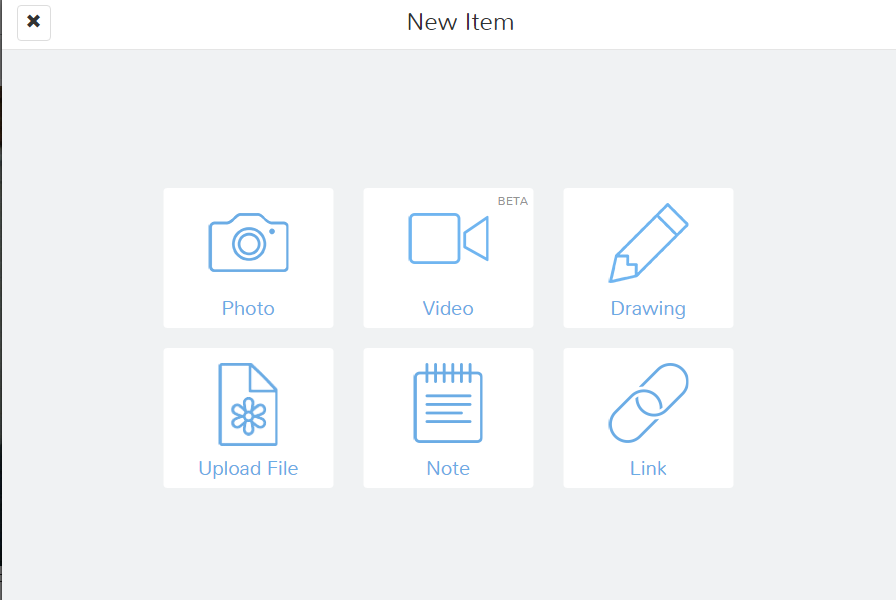
4. Once they have added an item, your students will add a caption OR leave a voice recording that talks about the work they are displaying. 

 5. Teachers must approve students' journal entries so we are able to help guide them towards habits that will help them create a positive digital footprint. While they are learning, Seesaw provides a safe environment. Seesaw has earned a very high rating on common sense education, which is a very respected reviewer of educational applications. 

From another perspective, as a parent, it is difficult for me to know what is going on with my kids schoolwork now that they are doing so much of their work digitally. I can't just go into their backpacks and look through their folders (thank goodness!). All of the digital work can be unnerving because I want to support my kids and have conversations about what they are doing in school. 
Seesaw makes it easy to connect parents to see their students' work and be able to have a "window into my child's school day", according to the seesaw website. This of seesaw as a communication platform between students, parents, and teachers.  

Seesaw can be used on any device and the free version has an outstanding platform with features that students will actually want to use. 


Here is a screenshot of my first photo journal entry to my Seesaw class!


Are you using Seesaw or digital portfolios and blogs in your classes? Post in the comments below and share your thoughts. 

Tuesday, May 3, 2016

FTT - Psnap.it

Make More Positive A Snap 
With Psnap.it


@LisaBerghoff/@joe_edtech


This is a pretty big week!

Happy Teacher Appreciation Week to all of my wonderful colleagues and friends who are working tirelessly to provide our students with the absolute best learning experiences possible.  AND an early Happy Mother's Day (on Sunday- take the hint) to all of the moms who do the world's hardest job each and every day.

Since we're in the spirit of appreciation and gratitude (especially now that PARCC testing is over), this seems like the perfect time of year to introduce you to my latest discovery and absolute favorite free tech tool: Psnap!  

Psnap is my favorite because it is all about storing and sharing moments of positivity.  On the surface, Psnap may seem like a fluffy, cutesy system for giving people props. Actually, it was carefully created by the fantastic people at PF Loop, Inc. They have been looking at scientific research that shows the impact that remembering moments that matter and exchanging positive expressions has on one's health, wealth, and wellbeing. A partial list of the researchers and academic published writings that helped guide the development of Psnap can be found here.  The idea is that often when something wonderful happens whether it be a really big deal or just a small random act of kindness, over time we will most likely forget that positive moment. Psnap allows us to capture that moment and store it, share it, or take it out later and remember it.  Remembering and celebrating positive things in our lives can make a big difference. 


Here is how it works...

Go to psnap.it to create an account. You can send a Psnap to anyone with an email address. Once they accept their Psnap,  an account is automatically created for them.  To create a Psnap, just click on the "create" button at the top of the screen.  You will add the receiver's email address and then choose the type of Psnap you want to send. The images that are there will change daily. You can also add your own image or leave it blank.  Next, you will type in the subject and then a message. You will choose a category and add a tag value for this Psnap. As you send and receive Psnaps, you will be able to sort and filter by category and tag value. Click the orange "Psnap.It" button and you've sent a Psnap!


When you open a Psnap, it looks like this..


Make sure that you have all of your email addresses listed in your profile so you can send and receive to and from family, friends, colleagues, etc. Your Psnap dashboard shows all of your psnaps and is a wonderful scrapbook of positive moments that you can look back on and smile. 
Psnap is a "work in progress" and the developers are always looking for feedback and suggestions. 

Let's put some positive into the world this week with Psnap. Thank a colleague, appreciate a friend, let your mom know she's amazing, etc. Receiving an email that you have a Psnap waiting will definitely make you smile. 

How many Psnaps can we send in May?  Let's find out. Let us know what you love about Psnap. Feel free to add to the comments below. 


Tuesday, January 5, 2016

FTT - Text 2 Mind Map

Text 2 Mind Map Home Screen
Support Both Linear & Non-Linear Thinkers With Text 2 Mind Map

@joe_edtech/@LisaBerghoff

You don't have to spend very much time trying to solve a problem or work through a set of directions with a group of people before you figure out that people think about things differently. I have two friends who love to put things together and are considerably better at that than I am. However, they go about it in very different ways. One is meticulous about reading every word of the directions provided or manuals included before he ever attempts construction. Then he will lay out all of the materials and tools and follow the directions line by line until he is finished. Friend number two is a tinkerer. He believes that directions and manuals represent the least possible creative way to complete the job. Since I've seen them both build some amazing and beautiful things, it is impossible for me to say which one of them is doing it "the right way."

The same kind of thing applies to the classroom. I've worked with teachers who insisted that their students take notes a certain way, sometimes using a certain color of pen, highlighting, and underlining, and numbering the items exactly as the teacher would have done it if the teacher were taking the notes. I even understand this method of teaching - some students really need some directions on taking notes. However, in my first year of teaching AP European history, I met a student that simply didn't think in a fashion that fits with structured note taking. Often times, when he was trying to understand relationships, he would draw pictures. Since he was easily the best, and most engaged student in the class, it would have been silly for me to require him to take notes in a manner that is awkward and foreign to him. That is why I believe it is important for us to offer students choices, and help them learn how they best learn.

In a previous blog post, I wrote about the importance of making Mind Mapping available to kids who don't necessarily think in a linear fashion. But what do you do if you have to accomodate both linear and non-linear thinkers in one group? Text 2 Mind Map is a pretty simple Web 2.0 solution that allows kids to create Mind Maps from outlines. They maps can be downloaded or shared via email. Here is a brief overview of using Text 2 Mind Map:


The downside to Text 2 Mind Map at the moment is that it isn't truly a collaborative Web 2.0 tool. In other words, your students can't create accounts (that is a premium feature) and share editing privileges with another student or with you. This is strictly for creating a mind map from an outline.

-----------------------------------------------------

What tools do you use to help kids think about their own thinking?


Tuesday, September 15, 2015

FTT - StayFocusd

Helping Kids Teach Themselves To Avoid Distractions

@joe_edtech

One of my favorite blogs is "Mind Shift: How we will learn," a product of Northern California's Public Media outlet KQED. One of their posts that came up in my Twitter feed this weekend was called "Age of Distraction: Why It's Crucial for Students to Learn to Focus." There have actually been a ton of studies done on this dating back to the 1970s. Some of my favorite pieces have come from Daniel T. Willingham, cognitive psychologist from the University of Virginia. Both the studies featured in the "Mind Shift" article and the ones from Willingham suggest that it is important for educators and parents to help kids learn how to manage distractions, especially distractions that are readily available to them on digital devices. This research, by the way, is one of the reasons I don't support the idea of simply blocking social media and other sites on school devices. That doesn't teach them discipline; it actually ignores the long term issue.

However, as you know, kids learn differently. Some of them require a little more direct instruction and a little more scaffolding of skills. StayFocusd is a free extension, available in the Chrome Web Store, that can offer a little assistance to kids who need it. One of the problems for some kids, and perhaps this director of instructional technology, is that they can get lost on distracting websites and not even know how much time they waste there. StayFocusd can help quantify wasted time and allow students to limit wasted time.
StayFocusd in the Chrome Web Store


The Nuclear Option
Once you add the extension to Chrome, you can set your own time limits on websites that might be distracting you from your real work. You can decide to enact the "Nuclear Option," which means, for instance, that you can set a specific amount of time that you are allowed to spend on Facebook. When that time limit is reached, Chrome will shut down that tab and the program won't allow you to navigate to the site again for 24 hours. You can also set an "active" calendar, meaning that StayFocusd will always manage your browser during school days, but on the weekends and during holidays, you can grant yourself a little more browsing time. For students who are afraid they might cheat and change the settings, there is a "Challenge" option. "If this option is selected, you will be required to complete a difficult -- but not impossible -- challenge before you are allowed to change any settings. This makes it inconvenient for you to change settings, therefore reducing the chances that you'll cheat" (StayFocusd settings page).

For some teachers, StayFocusd falls short of their ideal because it doesn't allow teachers or counselors to directly manage the student machines. However, I see that as a strength, because what we are really doing is providing the tools necessary for kids to teach themselves to be in control of their devices and their digital lives.

If there is a student you think could benefit from StayFocusd, please share it with them - and maybe their parents, too.

Thursday, September 3, 2015

Growth Mindset #1

I Can't Do That...Yet!
Teaching Kids To Have A Growth Mindset

@joe_edtech

I have a friend and colleague who gets very upset when he hears adults say with some merriment, "Oh, I'm just not good at math!" His argument goes a little something like this: You would never hear an adult proclaim that they can't read because letters just aren't their thing, but it is somehow ok to say that you aren't good at math because numbers aren't your thing.

I actually get that. It harkens back to one of the most dangerous concepts every embraced in education, that people are born with a certain kind of ability or they aren't, and that's all there is to it. Well, if that is the case, I'm not really sure why we spend this much time in public schools.

As adults, we certainly select jobs, hobbies and activities based on attitudes and aptitudes, but I think it is anti-intellectual and dangerous, especially for young people, to accept that kind of thinking. I think it comes from a way of thinking that suggests that making mistakes or experimenting with mental concepts is a sign of weakness, instead of a sign of real strength. If I thought like this, I would have to accept that because I cannot do calculus right now, I can never do it - I'll never be a success in that field.

By the time they get to high school, too many of our students have accepted that they aren't good at math, or science, or school in general. My daughter is an 8th grader who sometimes falls into that trap with school, but never so when it comes to extra-curricular activities she is interested in. She's in color guard. That means she spins flags, sabres, and rifles while dancing - ok, that may not be everyone's wheelhouse. But, when she tries a new toss with her rifle (she's currently working on something called a quad) she doesn't expect to get it right away. She does, however, expect that with study and practice, she will get better - and she will ultimately gain mastery. As an educator, I find that very instructive.

Carol Dweck, psychologist from Stanford University, would suggest that when she practices color guard, my daughter is employing "The Growth Mindset," which that suggests that humans can set and achieve personal goals, and that what is ultimately important is that we believe we can get better at something. We believe that we can grow, and we accept mistakes as necessary growing pains along the way.

Think about the kids you know. When it comes to extra-curriculars, sports, activities, and hobbies, do they display a "Growth Mindset?" How about in Math? Science? English? Using Technology (no - it is not ok to simply say, I'm sorry, I'm not good at technology)?

How about you? When you try something new, what is most important at the beginning of the activity, immediate success or evidence of growth? 

----------------------------------------------------------------------------------------------------------------
"The Growth Mindset" is an idea worth developing. Next week I'll share some ideas for discussing this topic with your students.