Showing posts with label Informal Learning. Show all posts

Tuesday, April 19, 2016

FTT - OpenBadge.me

Changing the Educational Game
with Digital Badging

@joe_edtech/@LisaBerghoff


A couple of years ago, I attended a conference that hosted a TEDx event instead of a Keynote address. Perhaps the most outstanding speaker I saw that night was Ali Carr-Chellman from Penn State University who talked about her program, "Re-Engaging Boys." If you have a few minutes, you can watch her TED Talk below:


If you don't have time to watch the whole thing, here's a brief summary of a couple of the statistics she cites:

  • For every 100 girls suspended from school, there are 250 boys suspended from school.
  • For every 100 girls expelled from school, there are 335 boys expelled from school.
  • For every 100 girls in special education, there are 217 boys.
  • For every 100 girls diagnosed with emotional disturbance, there are 324 boys.
  • The numbers are worse for boys of color, or boys who come from economically challenged homes.
  • Boys are 4 times as likely as girls to be identified with ADHD.
  • 60% of Baccalaureate Degrees go to women - some universities are approaching 70%
One of Professor Carr-Chellman's suggestions is that we can re-engage boys by utilizing video games in the classroom. While her research might be the most extensive on the topic, Professor Carr-Chellman's conclusions are not unique. There is a growing chorus of teachers out there who suggest that adding some elements of gamification can boost student engagement across the board, but especially in boys. 

I started thinking about this topic again because Lisa and I attended the CoSN conference two weeks ago, and the most dynamic session I attended while I was there was about gamification in the classroom by Dr. Liz Kolb from the University of Michigan. Dr. Kolb said her research was really in its beginning phases, but she had seen some positive results by adding elements of gaming to her preservice education courses, and she reported that those gains were highest amongst her male students.

Dr. Kolb suggested that it is fairly easy to start the process of gamification by instituting some student choice into your classroom activities and awarding students digital badges based on accomplishments. I think I'll have much more to offer the district from Dr. Kolb's work in the very near future, but for those of you who might be ready to start badging in the classroom, you need two things. You need a site for creating badges, and you need a site for posting and awarding your badges. For this week, let's focus on creating digital badges.

Part of the Mozilla Open Badges Project, OpenBadges.me allows you to create simple graphic badges that you can download to your computer and post to any website. According to the website, the OpenBadges.me "designer provides a simple way to layer different shapes and images on top of each other to create an attractive Open Badge graphic. The tool lets you add text, color elements, move certain elements and even fade items in and out - all presented in an easy-to-use web page."


Click here for an easy to follow guide on using OpenBadges.me. If you get stuck, you can even go to the guide and post a question. Someone from the Open Badges community will respond to your question.
----------------------------------------------------------------------------------------------------------------------

Next week, I'll provide you with three different platforms for posting and awarding badges to your students.

Tuesday, March 22, 2016

FTT - Tools to Maximize YouTube in Class


Maximize The Benefits Of YouTube, Minimize The Annoyances

@LisaBerghoff/@Joe_Edtech


It is so exciting to see how many teachers are taking advantage of YouTube in the classroom. According to Digital Stat Articles 2/14/2016, 82% of internet users aged 14-17 use YouTube. It makes sense that we would leverage this user- friendly, engaging, massive collection of videos for our students' benefit. There are endless possibilities when it comes to learning applications with video. As much as I love YouTube, there are a few minor inconveniences that can feel not so minor when you are in front of a room of 25 adolescents.  First of all, how often have you cued up an amazing video for your class but first you must awkwardly sit through a 15 second commercial?  I am usually just crossing  my fingers that it's an ad for something that is  age appropriate and extremely boring. Otherwise, guess what my students take away from the whole lesson?  That's right! All of that time I spent searching for the perfect video is completely wasted because of one 15 second ad.  Ok, here's another one.  The video is over, the students were completely amazed and are ready to discuss, apply, and extend what they have learned (work with me here) but YouTube shows an entire screen of additional videos that I may or may not want to show.  While we're at it, does anyone else find the strip of related videos down the side of the screen very distracting?

You get the point.
What's a teacher to do?

I have a few tools for you to try that are designed to eliminate these annoyances and maximize the benefits of video.

Adblock for YouTube 

This is a chrome extension which means it lives in the upper right corner of your chrome address bar. Little known fact, that chrome address bar is called the omnibox. There will be extra credit for anyone who uses the word omnibox in a sentence today. The Adblock for YouTube extension magically takes away those ads that automatically play before your actual video plays.


Quietube and Viewpure


Removing the video ads is wonderful but what Quietube and Viewpure do is absolutely amazing. These free tools eliminate the distractions such as suggested videos, comments, and ads.  When you go to Quietube's website you will be very underwhelmed. These are no frills tools that deliver on their promise to do a specific job. All you need to do on your end is drag the quietube button up to your bookmarks bar and when you are watching a video on YouTube, simply click the button.  You will get a clean screen with nothing but a viewing box showing your video.  Viewpure works very much the same way.  You can drag the "purify" button up to your bookmarks bar or insert the YouTube link into the space on the website and click "purify" to get the new link. Under the viewing box you can click to get a short link to share with your students so they too will only see the video.  You can put that link into Google classroom or whatever system you use to  share content with your class.  When your students click the link, they will view the video in quietube format.  You also have an option for a black background.  Here is a 35 second tutorial:


DF YouTube (Distraction Free) 


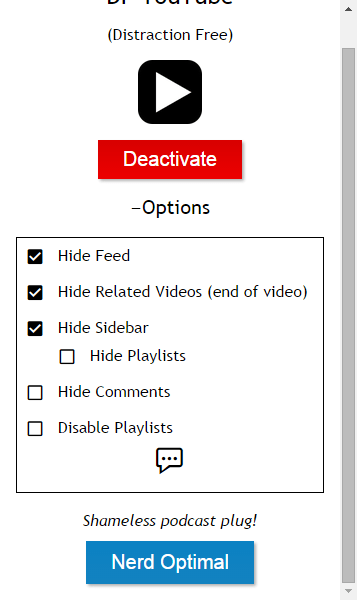
If you're still reading this post then your persistence will be rewarded. I have saved the best (in my opinion) for last.  DF YouTube is a chrome extension that takes away the ads, thumbnails, video recommendations grid that appears at the end of a video, comments, etc.  The extension makes all of these settings configurable!  You can click on the extension and click "options" to easily check or uncheck what items you would like to hide.  The one downside to DF YouTube that I can see is that it does not give you a link to share with your students.  This extension is perfect for displaying a video to a group.  If you are sharing a video with students and you want it to be without the distractions, I would suggest using Quietube or Viewpure.


As we continue on this journey of transforming education through the use of new tools and a new way of thinking about teaching and learning, I am confident that video will remain a fan favorite in our classrooms.
-----------------------------------------------------------------------------------------------------------------
How are you using YouTube with your students?  Post in the comments below. I'd love to hear from you!

Tuesday, March 1, 2016

FTT - Choosito!

Using Choosito! to Differentiate by Reading Level

@joe_edtech / @LisaBerghoff

Technology changes. Sometimes, I don't like the changes. But it happens and I learn to get over it. For instance, I have spent a lot of my time teaching people how to search well using Google's Advanced Search features - and one of the things I loved to teach about was sorting results by reading level. OK, Google didn't give you Lexile levels or anything like that, but the search engine used to categorize the results by Basic, Intermediate, or Advanced reading levels. Alas, Google giveth, and Google taketh away - reading levels are no longer available in Google's Advanced Search. 

However, Choosito! is a free Web2.0 tool that will allow you to search the web, and their curated library, and filter by both content and reading level. Here's a short video to help explain Choosito! a little better:


Once you create a free account and log in, you can go to Choosito! Search. Simply enter the topic as you would on Google, then choose your categories. What reading level do you want? Are you looking for that topic in Humanities or Business & Career? And are you searching the web, the Choosito! Library, or are you searching for a school safe image?
When you get your results, you get a little more than a link to a website. You get a preview of the page, the website "ranking" from other Choosito! users, and the ability to add the resource to your own curated page (click the "+"). Some of your resources may have an icon that looks like a little red schoolhouse. That means the resource has been vetted by a number of other teachers and librarians and added to the Choosito! library.
____________________________________________________________________________

If you've found other ways to get differentiated Internet search results, please tell us about them below.


Tuesday, February 16, 2016

FTT - Side by Side Data Maps

Comparing and Creating Side-by-Side Maps with GE Teach

@joe_edtech/@LisaBerghoff

You know what has been really fun about the Presidential Primaries so far? I don't either, but as the traveling circus goes from state to state, and the candidates talk about issues affecting our globe, we have an excellent opportunity to engage our students in real conversations about how geography, political and physical, impact economic and political choices. What impact can we see on the primaries in New Hampshire and South Carolina based on issues like demography, population density, and migration? Is there anything about geography that makes one group of candidates more popular in the northeast and another group popular in the south?

GE Teach is a fairly basic web 2.0 tool that you could give to your students to explore those kinds of issues. Furthermore, since GE Teach is built on Google Maps, you can have your students simply use the maps provided inside the tool, or they can import and analyze their own maps from Google. In it's basic form, GE Teach lets students compare different data sets in side-by-side or layered maps, or it lets students annotate and determine measurements for distances and altitudes.

If you are thinking of working with teachers from other disciplines, GE Teach is a simple tool that can be used to start conversations. What better way to discuss science, history, politics, language, and statistics that with comparative map data?

GE Teach is a relatively new tool, and it continues to change as it's creator, high school teacher Josh Williams adds and improves features. While it is fairly intuitive, it is easy to get lost playing with the maps and layers. The site offers several tutorial videos, and I would suggest starting with them instead of hunting and pecking on the site. But my best advice is to turn your students loose. Let them explore and create with the site. That might actually provide a leadership role to some of the students in your class who are great with these kinds of tools but who haven't always been seen as "academic" leaders in your class.

Here's Mr. Williams' intro video. It is almost 9 minutes, but provides a great overview to all of the basic capabilities of the site:


------------------------------------------------------------------------------------------------------------------
Can you think of a good lesson using GE Teach? Tell us about it in the comment section below.

Tuesday, January 5, 2016

FTT - Text 2 Mind Map

Text 2 Mind Map Home Screen
Support Both Linear & Non-Linear Thinkers With Text 2 Mind Map

@joe_edtech/@LisaBerghoff

You don't have to spend very much time trying to solve a problem or work through a set of directions with a group of people before you figure out that people think about things differently. I have two friends who love to put things together and are considerably better at that than I am. However, they go about it in very different ways. One is meticulous about reading every word of the directions provided or manuals included before he ever attempts construction. Then he will lay out all of the materials and tools and follow the directions line by line until he is finished. Friend number two is a tinkerer. He believes that directions and manuals represent the least possible creative way to complete the job. Since I've seen them both build some amazing and beautiful things, it is impossible for me to say which one of them is doing it "the right way."

The same kind of thing applies to the classroom. I've worked with teachers who insisted that their students take notes a certain way, sometimes using a certain color of pen, highlighting, and underlining, and numbering the items exactly as the teacher would have done it if the teacher were taking the notes. I even understand this method of teaching - some students really need some directions on taking notes. However, in my first year of teaching AP European history, I met a student that simply didn't think in a fashion that fits with structured note taking. Often times, when he was trying to understand relationships, he would draw pictures. Since he was easily the best, and most engaged student in the class, it would have been silly for me to require him to take notes in a manner that is awkward and foreign to him. That is why I believe it is important for us to offer students choices, and help them learn how they best learn.

In a previous blog post, I wrote about the importance of making Mind Mapping available to kids who don't necessarily think in a linear fashion. But what do you do if you have to accomodate both linear and non-linear thinkers in one group? Text 2 Mind Map is a pretty simple Web 2.0 solution that allows kids to create Mind Maps from outlines. They maps can be downloaded or shared via email. Here is a brief overview of using Text 2 Mind Map:


The downside to Text 2 Mind Map at the moment is that it isn't truly a collaborative Web 2.0 tool. In other words, your students can't create accounts (that is a premium feature) and share editing privileges with another student or with you. This is strictly for creating a mind map from an outline.

-----------------------------------------------------

What tools do you use to help kids think about their own thinking?


Tuesday, September 15, 2015

FTT - StayFocusd

Helping Kids Teach Themselves To Avoid Distractions

@joe_edtech

One of my favorite blogs is "Mind Shift: How we will learn," a product of Northern California's Public Media outlet KQED. One of their posts that came up in my Twitter feed this weekend was called "Age of Distraction: Why It's Crucial for Students to Learn to Focus." There have actually been a ton of studies done on this dating back to the 1970s. Some of my favorite pieces have come from Daniel T. Willingham, cognitive psychologist from the University of Virginia. Both the studies featured in the "Mind Shift" article and the ones from Willingham suggest that it is important for educators and parents to help kids learn how to manage distractions, especially distractions that are readily available to them on digital devices. This research, by the way, is one of the reasons I don't support the idea of simply blocking social media and other sites on school devices. That doesn't teach them discipline; it actually ignores the long term issue.

However, as you know, kids learn differently. Some of them require a little more direct instruction and a little more scaffolding of skills. StayFocusd is a free extension, available in the Chrome Web Store, that can offer a little assistance to kids who need it. One of the problems for some kids, and perhaps this director of instructional technology, is that they can get lost on distracting websites and not even know how much time they waste there. StayFocusd can help quantify wasted time and allow students to limit wasted time.
StayFocusd in the Chrome Web Store


The Nuclear Option
Once you add the extension to Chrome, you can set your own time limits on websites that might be distracting you from your real work. You can decide to enact the "Nuclear Option," which means, for instance, that you can set a specific amount of time that you are allowed to spend on Facebook. When that time limit is reached, Chrome will shut down that tab and the program won't allow you to navigate to the site again for 24 hours. You can also set an "active" calendar, meaning that StayFocusd will always manage your browser during school days, but on the weekends and during holidays, you can grant yourself a little more browsing time. For students who are afraid they might cheat and change the settings, there is a "Challenge" option. "If this option is selected, you will be required to complete a difficult -- but not impossible -- challenge before you are allowed to change any settings. This makes it inconvenient for you to change settings, therefore reducing the chances that you'll cheat" (StayFocusd settings page).

For some teachers, StayFocusd falls short of their ideal because it doesn't allow teachers or counselors to directly manage the student machines. However, I see that as a strength, because what we are really doing is providing the tools necessary for kids to teach themselves to be in control of their devices and their digital lives.

If there is a student you think could benefit from StayFocusd, please share it with them - and maybe their parents, too.

Thursday, September 3, 2015

Growth Mindset #1

I Can't Do That...Yet!
Teaching Kids To Have A Growth Mindset

@joe_edtech

I have a friend and colleague who gets very upset when he hears adults say with some merriment, "Oh, I'm just not good at math!" His argument goes a little something like this: You would never hear an adult proclaim that they can't read because letters just aren't their thing, but it is somehow ok to say that you aren't good at math because numbers aren't your thing.

I actually get that. It harkens back to one of the most dangerous concepts every embraced in education, that people are born with a certain kind of ability or they aren't, and that's all there is to it. Well, if that is the case, I'm not really sure why we spend this much time in public schools.

As adults, we certainly select jobs, hobbies and activities based on attitudes and aptitudes, but I think it is anti-intellectual and dangerous, especially for young people, to accept that kind of thinking. I think it comes from a way of thinking that suggests that making mistakes or experimenting with mental concepts is a sign of weakness, instead of a sign of real strength. If I thought like this, I would have to accept that because I cannot do calculus right now, I can never do it - I'll never be a success in that field.

By the time they get to high school, too many of our students have accepted that they aren't good at math, or science, or school in general. My daughter is an 8th grader who sometimes falls into that trap with school, but never so when it comes to extra-curricular activities she is interested in. She's in color guard. That means she spins flags, sabres, and rifles while dancing - ok, that may not be everyone's wheelhouse. But, when she tries a new toss with her rifle (she's currently working on something called a quad) she doesn't expect to get it right away. She does, however, expect that with study and practice, she will get better - and she will ultimately gain mastery. As an educator, I find that very instructive.

Carol Dweck, psychologist from Stanford University, would suggest that when she practices color guard, my daughter is employing "The Growth Mindset," which that suggests that humans can set and achieve personal goals, and that what is ultimately important is that we believe we can get better at something. We believe that we can grow, and we accept mistakes as necessary growing pains along the way.

Think about the kids you know. When it comes to extra-curriculars, sports, activities, and hobbies, do they display a "Growth Mindset?" How about in Math? Science? English? Using Technology (no - it is not ok to simply say, I'm sorry, I'm not good at technology)?

How about you? When you try something new, what is most important at the beginning of the activity, immediate success or evidence of growth? 

----------------------------------------------------------------------------------------------------------------
"The Growth Mindset" is an idea worth developing. Next week I'll share some ideas for discussing this topic with your students.

Thursday, May 21, 2015

Brainstorming Tools

10X GameStorming: Brainstorming with Big Changes in Mind

@joe_edtech

This blog post is really a reflection of a bunch of great ideas that were hatched by several different people and then brought together and improved upon by still more people. In otherwords, it's really about the power of group collaboration. 

Several weeks ago I attended what I hope was the first of many Illinois Google Education Leadership Summits. A couple of guys from Google were there and they were demonstrating some of the activities that happen in the "Garage" on the Mountain View campus. The "Garage" for Google is a little like Microsoft's Hackathon centers, it is a place designed to facilitate group thinking and tinkering.

While we were there, they talked about the goals of their brainstorming sessions, inspired by the 10 X Rule recently written about by Grant Cardone. From Cardone's book cover, "While most people operate with only three degrees of action-no action, retreat, or normal action-if you're after big goals, you don't want to settle for the ordinary." In other words, don't just imagine change - take whatever change you've imagined it and make it 10 X bigger. At the Summit in April someone made the point that the alternative is to plan for incremental change. But if you do that you will only get incremental results.

After talking about the goal for a bit, the Google Edu team shared with us one of their methods. They called on strategies from a website called "Gamestorming" (but actually is http://www.gogamestorm.com/). On it's Wiki page, Gamestorming offers a tremendous list of brainstorming activities that you can try. The one we practiced with that day, and that I have since used with a great deal of success, is called, "Start, Stop, Continue." The activity begins by having participants reflect and write on practices in their organization that they would like to see started, those that should be stopped, and those that should continue. Collaboration in growing concentric circles leads a couple of big ideas to bubble up and reach a critical mass in the group.

This is actually the time of year when hope for even better things in the Fall starts to build. Is there a group that you work with on a regular basis that you can challenge to think not of the safest baby steps you can take for next Fall but of bigger things - maybe things that are 10 X better? And what kind of conversation could you have if you asked every member of your group, PLC, team, or classroom what they would like to start doing, stop doing, or keep doing? 

The conversation might be life changing.

---------------------------------------------------------------------------------------------
If you have a great brainstorming technique you've used with success, please tell us about it below.

Thursday, November 20, 2014

Digital Portfolios

photo credit: JD Hancock via photopin cc
What Is Important To Your Students?

@joe_edtech

There has been a convergence of ideas in the books I've read recently. Daniel Pink's books Drive and A Whole New Mind both discuss the need for our schools to move beyond the structure and thinking of the Industrial Revolution and to provide students with multiple opportunities to think, create, and design for themselves. Sir Ken Robinson's Finding Your Element expands on his earlier work and criticized the artificial hierarchy and division of subjects and the need for all students to find support for their passions in schools. Danah Boyd's It's Complicated spends some time discussing the need for teens to develop autonomy and voice even when fear and adult overreaction often restrict them from doing so. 

It seems to me that simply adding more elements of student inquiry and student choice into the educational process can move us closer to the ideas written about by Pink, Robinson, and Boyd - and that without spending a single additional cent from already tight budgets.

Do you use student portfolios? If so, are kids instructed what to place in those portfolios and when? What would happen if you offered the portfolio as an opportunity instead of an assignment? What would it look like if it was offered as an opportunity school wide and all your departments supported it?

Two years ago I worked with the coordinators of a high school Literacy Lab to develop a template for all of their students to create a digital portfolio showcasing the work they completed in their high school years. The template included a blank page and directions for each of their four years. It was a great idea (not mine, of course - I was just happy to support it). But, I think it is time for a little revision.

Last Spring I had the opportunity to attend a workshop lead by George Couros, Division Principal for a school district in Alberta, Canada (@gcouros). The students in his school district create digital portfolios as well. However, when they get to high school, the students decide what, when, and how they post their work to their portfolios, and the portfolios can include not just classroom pieces, but blogs and photos if students choose to include them.

The idea is that in the elementary and middle school years teachers provide more support for students as they choose works to post online, and help them organize their portfolios in a way that makes sense. In high school, though, teachers encourage students to become digital leaders and develop a digital footprint that "won't just keep them from getting a job, but will actually lead to them getting additional opportunities" (probably not an exact quote, but I wanted to give George Couros credit for the thought).

Since I don't work in a k-12 district, we don't see our students until they are in 9th grade. So we can't follow the k-12 model. However, we can spend freshmen year focusing on digital literacy and provide them scaffolding and support for creating a positive digital footprint, then encourage them to create their own portfolios beginning with their 10th grade year. What would happen if we kept the structured template for the freshman year but then just provided them with a platform for them to create their own voice and vision throughout their high school years?
--------------------------------------------------------
Do your students create digital portfolios? How much autonomy do your students have in creating their digital portfolios?

Monday, November 10, 2014

FTT - Blubbr Trivia

Blubbr - Trivializing the Classroom...
in a Good Way!

@joe_edtech

Last Winter, my daughter and I were riveted to the TV every afternoon during Jeopardy. One of my former students, a former Scholastic Bowl Captain, had a 6 day run on the TV show racking up more than $100,000 worth of winnings. I haven't told him this part yet, but I take full credit for his victories. For each of the days I watched the show with my daughter and a former colleague and his college aged daughter. So, there were at least four of us, and sometimes more of us, sitting in the family room shouting answers to trivia questions at Alex Trebek. I'm not sure he heard us, but it was great fun anyway.

So, continuing a "Gamify your Classroom" theme we started when we discussed Kahoot:

Alex, for $200 I'll take "Gaming in the Classroom." The answer is, "This Web 2.0 Product lets students and teachers play and create video trivia, and it costs nothing to use." -- What is "blubbr.tv?" "Circle gets the square!" (Wait, that might be a different show.)

I could take some time to tell you how to use Blubbr.tv, but I think it would be more effective for you to learn about Blubbr from Blubbr Click here to play the Blubbr Triv Game!

In a nutshell, Blubbr lets your create a series of questions based on short YouTube videos. These can be videos that you created and uploaded, or they can be videos that already exist on YouTube.


Not only great for formative assessment, Blubbr seems like a great way to reteach or reinforce a topic with students who struggle to chunk information on their own. On the other hand, it can just be good clean fun to review old topics or introduce new ones.
-------------------------------------------------------------------
Have another good Web 2.0 game to play in the classroom? Tell us about it below.

Wednesday, November 5, 2014

Google Search Pro

Teach Them How To Fish Well

@joe_edtech

I would love to tell you that when you ask your students to do research the first thing they are going to do is to log into your Library web page and utilize the incredibly content rich subscription databases that you've spent so much time and money curating. But they won't. The data we have on staff and students alike suggests that both groups heavily utilize those sites when they are specifically directed to do so, and almost always turn to Google Search when they are on their own.

So, instead of beating your head against the wall trying to convince them to use the subscription sites you've purchased, teach them how to live in their world a little bit more efficiently - teach them how to fish well with Google.

I teach my students that they have three opportunities to utilize the advanced features in Google search. They can use "search operators" in the actual search bar, they can click the "Search Tools" button after their initial search, or they can actually navigate to Google's custom made "Advanced Search" toolkit.

First, if you've grown up with Boolean searches, you'll be familiar with some of the Google special character search operators, but here are some of my favorites:

Operator
Example
What does it do?
“”
“digital copyright law”
If you put your search terms inside quotation marks, Google won’t search for topics. It will search for exact character matches. In this case it will only return searches that contain the phrase “digital copyright law” exactly as it is written.

“”
“The” Onion
You can also use quotation marks to force Google to include words it would not normally include in a search. “The” is a word Google would exclude, but if you are looking for the important news magazine listed here, you will want to include “The.”

-
big bang theory -show
Adding the minus sign removes terms from your search. In this example, we are actually looking for info on The Big Bang, not the TV Show.

filetype:
travel guide filetype:pdf
This returns a specific type of file. In this case we’ll only get PDF Travel Guides.

:(domain)
stars:nova.com
In this case I’m searching a specific domain. We’ll only get searches from the PBS Nova site.

*
Star Wars * my life
* acts as a wild card. In this case, Google will search for things that match the phrase and it will fill in appropriate words (is, changed, made)

~
~exhausted
~ in front of a word will tell Google you want to search for the word and similar words (tired, tuckered out, etc.)

Secondly, once you entered your initial search terms, you can hit the "Search Tools" button and make your search far more specific:

It is great and useful to search by time and location, but my favorite variable there is under "All results." You can choose sites by reading level. Unlike similar searches in Office products, this won't give you Lexile reading scores, but it will give you the number of results that are Basic, Intermediate, or Advanced reading levels.

Thirdly, if you really want to make your search specific, start the process by navigating to Google's Advanced Search. There you can fill out a form that allows you to put all of the relavent search terms into it and then narrow your search by things like file type, language, or even usage rights.
----------------------------------------------------------------
If you'd like to access my Advanced Search Guide, click here.

Tuesday, October 28, 2014

FTT - Google Experiences

Reaching Visual Learners Through Google's Educational Projects:

@joe_edtech

Have you ever wanted to take your students to explore the Battlefield at Gettysburg, or have them walk through the Louvre? Here's a solution that won't cost a dime or require you to arrange for transportation.

A couple of years ago I stumbled on a pretty cool Google project called the "Google Art Project." It was a plan from Google to make extremely high resolution artwork from around the world available for students and aficionados whether they actually had the resources to travel to museums and see the original pieces or not. Google boasts, "More than 45,000 [works of art] are featured in high resolution. Some have been photographed in extraordinary detail using super high resolution or 'gigapixel' photo capturing technology, enabling the view to study details of the brushwork and patina beyond that possible with the naked eye" (Art Project). 

Well, that was cool enough for me, but the Art Project has exploded, and has become the Google Cultural Institute, featuring not just an Art Gallery, but also History and World Wonder projects as well. Each one features the same high resolution photography, and, where applicable, Google Street View of museum or historical sites. Here's a short video overview of the Cultural Institute site:


But just in case that doesn't cover visual content for you, Google Earth and Google Maps have literally gone out of this world, incorporating images from the SETI Institute in their Google Maps Gallery as Google Earth files. You do not have to have Google Earth installed to view the images, but they do work as fully functioning Google Earth files.

"Google Moon" - from the SETI Institute Collection

In both cases, the visual products in Google can help you extend or situate your lesson, or you can incorporate some elements of student inquiry and invite your students to follow their curiosity.
-----------------------------------------------------------------------
Have you used these tools with your classes already? If not, can you think of a creative way to teach using Google's Cultural Institute or Google Earth? Please share in the comment section below.


Tuesday, October 21, 2014

FTT - Storify

Sorting Through the Social Media Noise

@joe_edtech

On the heels of our Twitter Challenge, I thought I'd offer you a tool designed to help you sift through your social media outlets and take a closer look at the things that are important to you.

Over the summer I read a book called The End of Big: How the Internet Makes David the New Goliath by Nicco Mele (somebody please ponder this paradox - the link I just included will take you to Amazon.com). I found the author to be extremely nostalgic about the good old days of high minded professional journalism, and even more so about the historic ability of the two big parties to produce quality, principled candidates for public office. However, he wrote a gripping history of the growth of Big Tech in the United States, and he suggested some great online tools. One of them is storify.com.

In the chapter on the end of big journalism, Mr. Mele suggested consumers should find some way to sort through the noise of social media and create order and meaning out of chaos by using online tools like storify.com . While I don't join the author's nostalgia about principled big journalism (“…You provide the prose poems, I’ll provide the War…” —Citizen Kane) I do agree that it is important for us to find ways to make sense of, and search for meaning in the Social Media outlets available to us.

Enter "Storify." If you create an account on storify.com, you can create your own news story out of the social media posts available to you. If you want to find all of the meaningful blogs, news stories posted on Facebook, or search for first hand Twitter accounts of world events, all you have to do is create a new story and search for the topic the way you would in Google.

Then you play editor. You decide which stories, posts, and tweets are important, and you create your own Social Media story. I've embedded a "Storify" story on "Storify" below. I know, not very creative.

What would be creative, though, is using tools like Storify and other social media tools to teach digital citizenship and Internet safety to your students. But I'll save that for the next post. 
------------------------------------------------------
How would you use storify.com with students?

STORIFY ON STORIFY:

Thursday, October 9, 2014

Personal Professional Development - Twitter Chats

photo credit: mkhmarketing via photopin cc
Getting Started With Twitter Chats

@joe_edtech

Why use Twitter? If you don't necessarily see value in Twitter as a social communication tool, surely every educational professional can see the value of  Twitter for Professional Development purposes - especially when it comes to Ed Tech and technology integration.

In an earlier post, I suggested that even if you never send a single Tweet, there is a lot to learn by following innovative thinkers on Twitter. Today's post is going to focus on getting involved in the conversation by following Twitter chats. For instance, #iledchat is a Twitter chat run by a few Illinois educators every Monday night from 9-10 PM. One recent discussion focused on "assessment." 

To follow a chat, you simply need to go to Twitter and search for the chat #hashtag (in this case, #iledchat):


Then you'll see a list of Tweets sent with that HashTag. For the #iledchat, at 9PM on Monday, a moderator will send a tweet introducing him or herself and the topic. Then they'll pose questions to the participating community. 

Questions will be labeled "Q1" and "Q2" and so on. Anyone following the chat can respond. This is what it looked like when people were responding to "Q2" during the assessment discussion - notice their Tweets start with "A2" and end with "#iledchat."


Don't worry about reading every Tweet, almost every Twitter Chat will post an archive of questions and answers at the end:

Here's the archive from last night's chat on Homework: http://sfy.co/gwIH

If you'd like to try it, here are a list of some of the most popular education related chats: bit.ly/officialchatlist  (compiled by @thomascmurray , @cevans5095 and @cybraryman1).
--------------------------------------------------
How do you stay current and provide yourself with personal professional development?